Screenshots
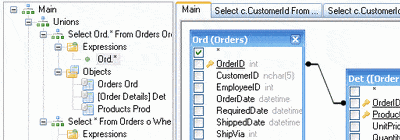
Adding objects to the query, automatic joins creation
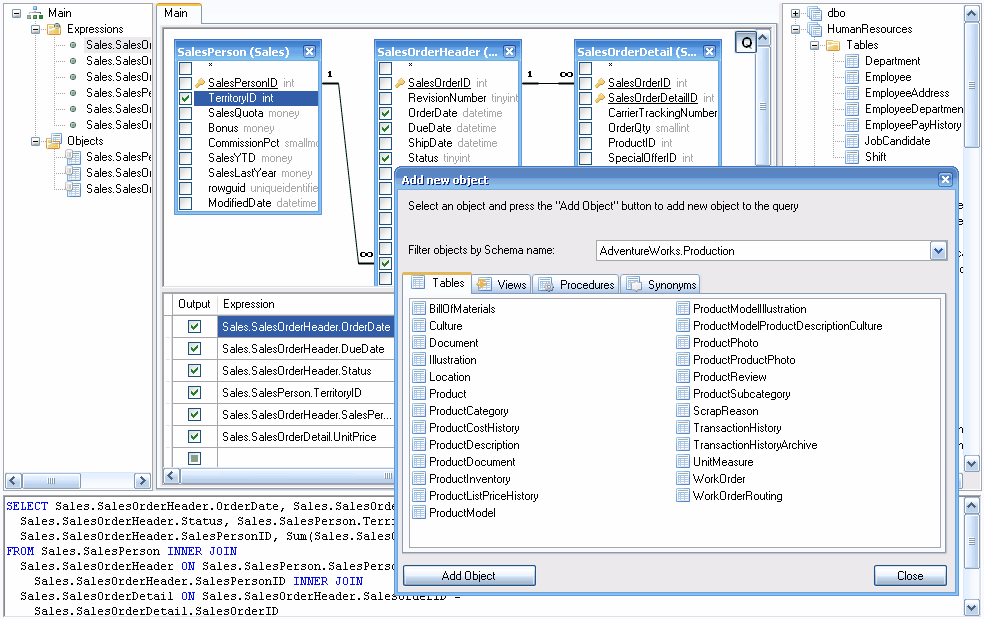
With Active Query Builder you can easily add objects to your query by dragging them from the database objects tree or using the Add Object window. Objects can be grouped by the database, schema name and object type.
Objects linked with foreign keys are joined automatically. You can allow or deny the end-user to create and remove joins manually.
All screenshots

News
- 12/14/2023
Active Query Builder ASP.NET Edition 3.10 adds support for SignalR client-server communication
Support for SignalR lets use Active Query Builder in Blazor apps. - 09/20/2023
Active Query Builder VCL Edition 1.34 adds support for Snowflake and Firebird 4
New SQL Text editor API improvements and performance optimizations are made. - 04/11/2023
Active Query Builder VCL Edition 1.33 speeds up the SQL text editor
The new SQL filter builder control lets save user-defined filters between work sessions. - » Active Query Builder news
-
Subscribe
Testimonials
We have been using Active Query Builder for over a year and must say that both the product and support have been outstanding!
We chose Active Query Builder due to its flexibility and features, but have been truly pleased by its power and hidden capabilities. ...
In summary Active Query Builder provides excellent components, great support and a very flexible feature set. It has allowed us to provide features to our end users that I did not think would be possible in the first release of our new tools and in a timeframe that was much shorter than planned. I would recommend that anyone dealing with databases in the .Net world should be aware of this component and its capabilities!